
Running a restaurant may look simple from the customer’s side. A customer walks in, places an order, eats, pays and leaves.
Behind that single transaction, however, there is much more happening. A cashier is taking the order, the kitchen is preparing it, staff are managing tables, someone is monitoring stock, purchasing needs to be planned, payments need to be tracked, invoices may need to be created, and management still needs to understand how the business is performing.
The challenge begins when every part of that operation is handled through a different system.
The POS knows about the sale. The kitchen knows about the order. A spreadsheet knows about inventory. Someone else manages reservations manually. Purchasing is tracked somewhere else. Management eventually has to bring all of that information together to understand what is really happening.
Clyro was developed by JH Systems to bring those operations into one connected environment.
It starts with the Point of Sale, but it goes much further than that.
A Point of Sale Built Around Real Restaurant Orders
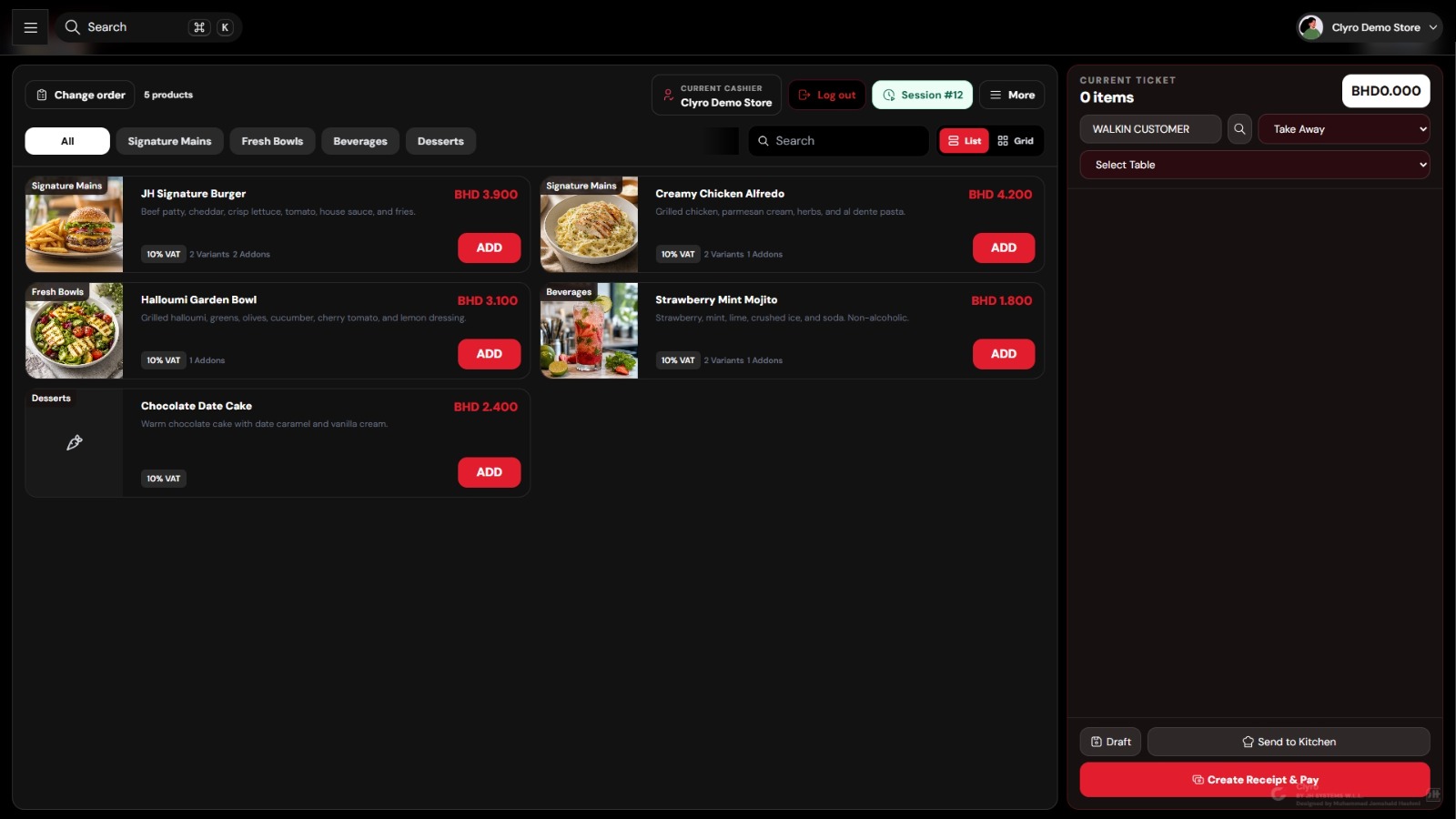 Clyro Point of Sale screen showing products and the current ticket.
The Point of Sale is where Clyro becomes part of the restaurant’s everyday operation.
Products can be organised into clear categories such as mains, bowls, beverages, desserts or any other categories the business requires. Staff can browse products visually or search for a particular item when needed.
Each product can contain the information required during ordering, including pricing, tax information, product variants and optional add-ons.
That becomes important because restaurant orders are rarely as simple as selecting one product and moving on.
A customer may want a different product variant, extra cheese, an additional topping, a quantity change or a special preparation request. Clyro allows those choices to remain part of the actual order instead of being communicated separately.
The current ticket remains visible beside the product catalogue, allowing the cashier to see exactly what has already been ordered while continuing to add items.
The active cashier and current POS session are also visible directly from the screen, providing clearer control over who is operating the register and under which session.
Dine-In, Takeaway and Table Orders
Restaurants usually handle several types of customers at the same time.
One customer may be dining inside the restaurant. Another may be collecting a takeaway order. Other customers may already be seated at tables.
Clyro supports these different workflows directly within the Point of Sale.
Staff can select the relevant order type and, where required, associate the transaction with a particular table.
Instead of forcing every customer through the same generic checkout process, the POS can reflect how the restaurant actually operates.
This is especially useful for restaurants handling both counter service and table service because orders, tables and restaurant operations can remain connected within the same system.
Variants, Add-ons, Discounts and Notes
Clyro order screen showing the burger variant, add-on, quantity, discount and notes options.
Restaurant orders constantly involve changes.
Customers want additional ingredients. They remove something from a meal. They choose different sizes or variants. Staff apply promotions. The kitchen may need special preparation instructions.
Clyro allows these details to be managed directly from the order.
A product can include selected variants and add-ons, while staff can adjust quantities, apply discounts and attach notes where required.
Instead of relying on verbal instructions between the cashier and kitchen, these details remain attached to the order itself.
The order entered at the Point of Sale should be the same order the kitchen receives.
Reducing the gap between those two stages can help reduce mistakes and unnecessary communication between front-of-house and kitchen staff.
From the Point of Sale Directly to the Kitchen
Taking the order is only the first step.
Once it has been entered, the kitchen needs to know what has to be prepared.
Clyro includes a dedicated Kitchen module and allows orders to move from the Point of Sale into the kitchen workflow.
Staff can send the order to the kitchen directly from the POS. If an order is not yet ready to proceed, it can also remain as a draft until the staff member is ready to continue.
This creates a much clearer workflow between the customer-facing side of the restaurant and the kitchen.
Customer Order → Point of Sale → Kitchen → Preparation → Completion → Payment and Record Keeping
The purpose is not simply to replace a printed kitchen ticket. The goal is to keep the order information connected throughout the restaurant’s operation.
Clear Tax, Service Charge and Payment Calculation
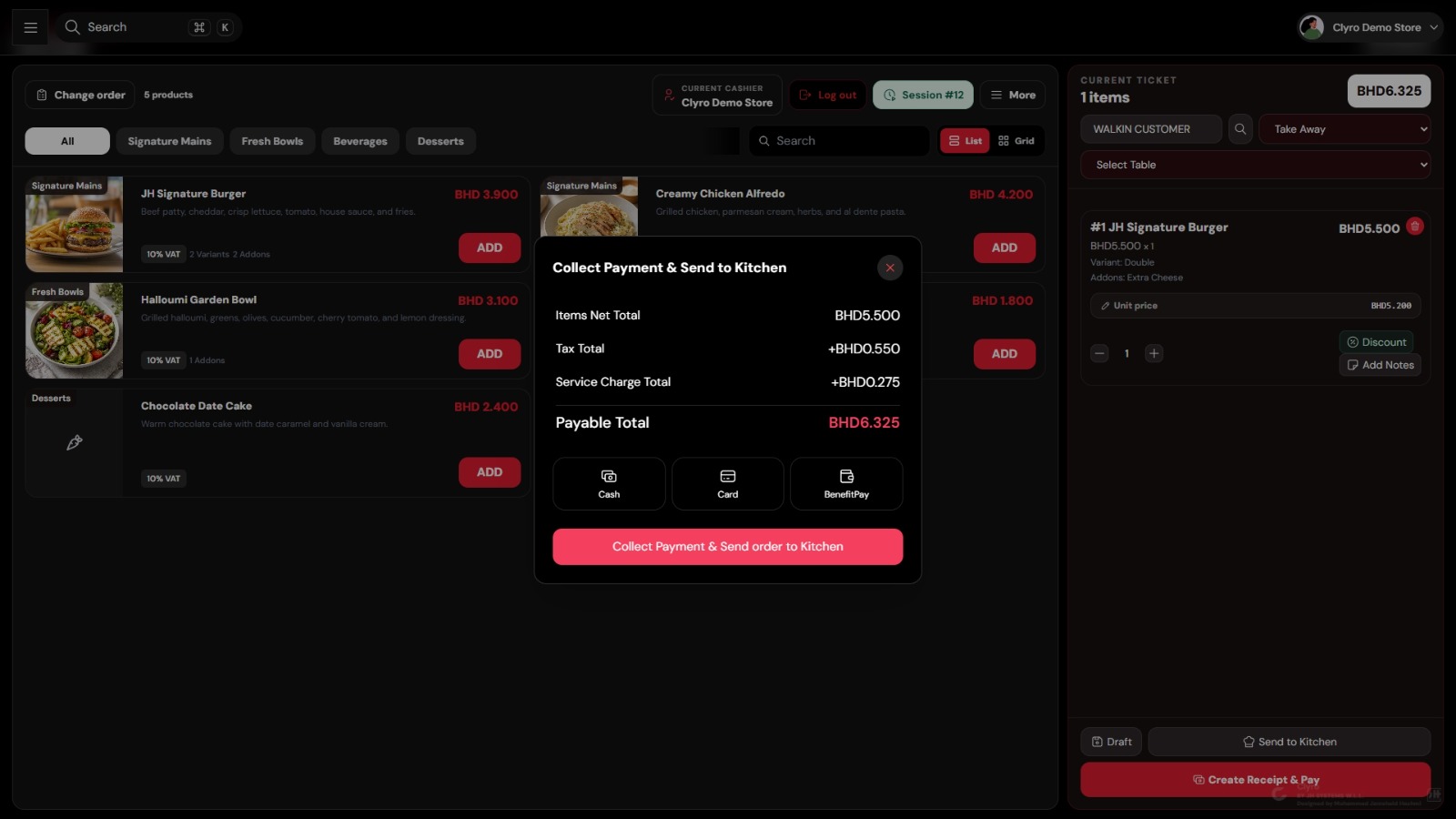
Clyro payment window showing net total, tax, service charge and payable total.
When payment time arrives, the cashier should be able to understand exactly how the final amount was calculated.
Clyro separates the items net total, tax amount and service charge before showing the final payable amount.
This gives staff a clear breakdown before collecting payment and makes it easier to explain the transaction if a customer asks about the total.
Different payment methods can also be presented directly during checkout.
In the current Clyro configuration shown in the system, options include Cash, Card and BenefitPay.
Once the payment method is selected, the transaction can be completed without the cashier needing to leave the restaurant workflow and record payment information somewhere else.
A Dashboard That Shows What Is Happening
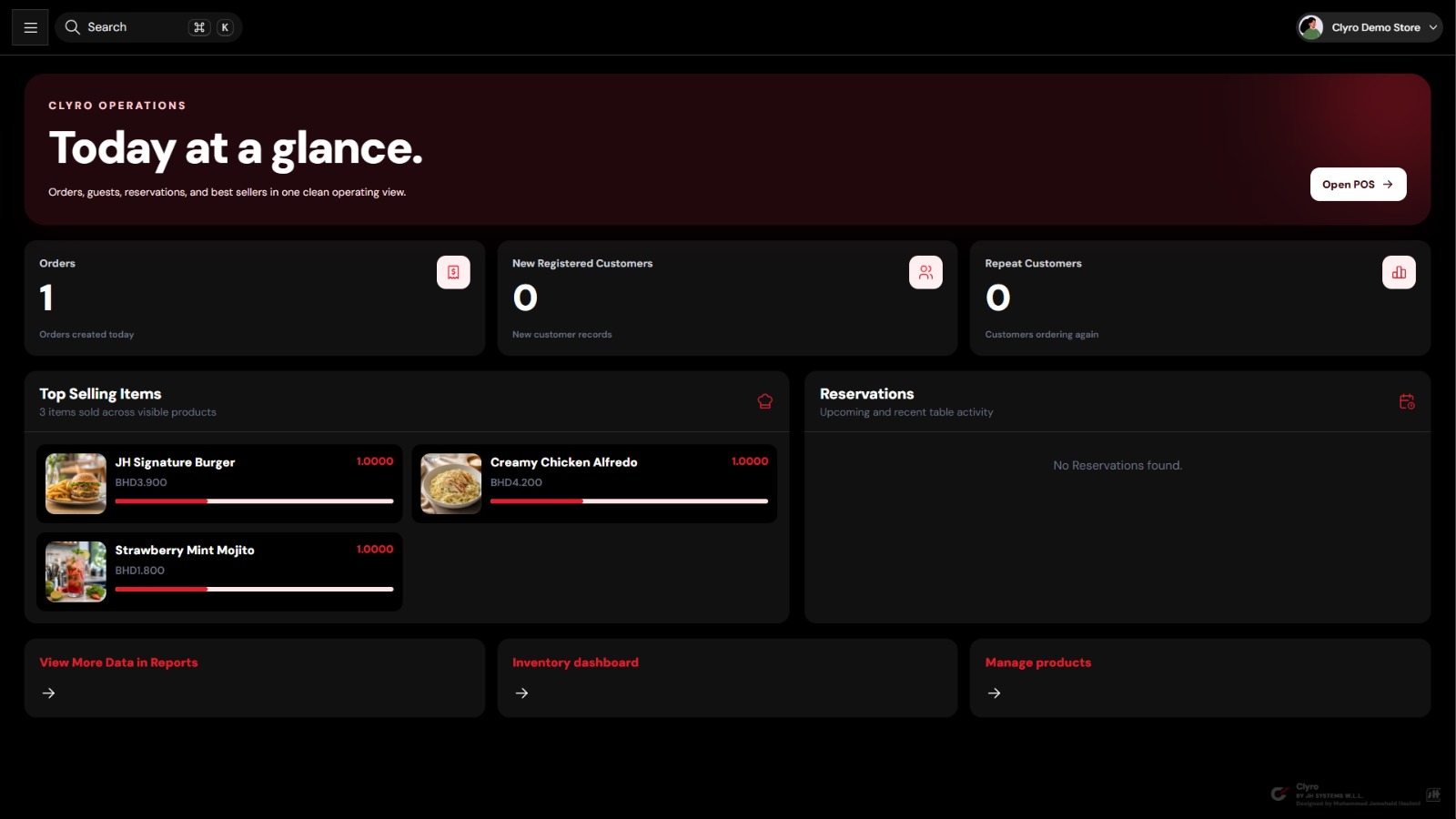
Clyro Today at a Glance dashboard.
The Point of Sale is primarily designed for employees serving customers.
Management needs a different view.
Managers and business owners need to understand what is happening across the operation without opening every individual module separately.
Clyro provides a central dashboard that gives a quick operational overview of the business.
The dashboard can show information such as today’s orders, newly registered customers, repeat customers, top-selling items and reservation activity.
This provides management with a starting point when opening the system.
Instead of searching through individual transactions, they can first see the bigger picture and then move into areas such as reports, inventory, purchasing or product management when deeper information is required.
Understanding What Customers Are Buying
One of the most useful pieces of information for a restaurant is knowing which products customers are actually ordering.
Clyro includes a Top Selling Items section directly within the operational dashboard.
Instead of relying on assumptions about what is popular, management can see product performance based on the actual orders being processed through the system.
That information can become useful when reviewing menus, planning promotions, managing stock and making purchasing decisions.
If one item consistently performs well while another rarely sells, management should be able to see that clearly.
Because these figures originate from the same environment where the orders are being created, there is less dependency on manually transferring sales information into separate reports or spreadsheets.
Customer Management and Repeat Business
A restaurant does not grow only by attracting new customers.
It also grows when existing customers return.
Clyro includes a dedicated Customers module, while the main dashboard can also provide visibility into newly registered customers and repeat customers.
This allows a restaurant to begin looking beyond individual transactions.
Instead of every order simply becoming another receipt, it can become part of a longer customer relationship.
For businesses focused on customer retention, having visibility into repeat business can help management understand whether customers are actually returning after their first visit.
Reservations Inside the Same Platform
Reservations are another area that often becomes disconnected from the rest of restaurant operations.
They may arrive through a phone call, WhatsApp message or social media conversation and then be written down somewhere separately.
Clyro includes a dedicated Reservations module and can also surface reservation information directly on the main dashboard.
This allows reservations to remain part of the restaurant’s operating environment rather than becoming an isolated process.
For restaurants handling table service, this can help staff manage upcoming guests alongside the rest of the restaurant’s daily activity.
Inventory Management
Sales cannot be separated from inventory.
Every product being sold depends on ingredients, materials or stock being available.
That is why Clyro includes a dedicated Inventory module rather than stopping once the transaction is completed.
Inventory management gives the business a clearer way to maintain visibility over the items and materials required to continue operating.
For restaurants handling a large number of ingredients, products and supplies, maintaining this visibility becomes increasingly important as the business grows.
Instead of thinking only about what has been sold, management can also focus on what needs to remain available to support future sales.
Purchasing and Stock Replenishment
Inventory tells the business what it has.
Purchasing manages how the business obtains what it needs.
Clyro includes a dedicated Purchasing module alongside its inventory tools.
Bringing purchasing into the same overall environment creates a more connected relationship between sales, stock levels and procurement.
The restaurant can move from understanding what is selling to understanding what needs to be replenished.
This is particularly useful for businesses that want stronger control over purchasing activity rather than waiting until stock problems appear.
Cashbook and Financial Tracking
Restaurants deal with constant financial movement.
Customers are paying throughout the day using different payment methods. Expenses occur. Cash enters and leaves the business. At the end of the day, someone needs to understand what actually happened.
Clyro includes a dedicated Cashbook area to support this part of the operation.
The idea is to move beyond treating the Point of Sale as an isolated cash register.
The wider financial activity of the business can remain part of the same management environment, giving the business a clearer structure for tracking transactions.
Invoice Management
Not every restaurant transaction ends with a standard POS receipt.
Some customers may require formal invoices. Restaurants may work with corporate clients, catering customers, account customers or larger orders that require a different billing process.
Clyro includes a dedicated Invoices module so that invoicing can remain part of the same business platform.
This reduces the need to maintain another completely separate system purely for handling invoices.
Delivery Hub
Restaurant sales are no longer limited to customers standing at the counter or sitting at a table.
Delivery has become a major part of restaurant operations.
Because delivery has its own workflow, Clyro provides a dedicated Delivery Hub.
This gives delivery activity its own place within the platform while still keeping it connected to the overall restaurant operation.
Orders coming through different channels can therefore remain part of the wider business environment rather than becoming another isolated process.
Sessions and Cashier Accountability
Clyro also includes dedicated session management.
A POS session creates an important operational boundary between different working periods.
The current session and cashier are visible directly from the Point of Sale.
For businesses with multiple employees, different shifts or several people using the same system, maintaining clear session information becomes increasingly important.
It provides better visibility into when transactions were processed and which employee was operating the system at the time.
Reports for Deeper Business Analysis
Collecting data is useful only when the business can understand it.
Clyro includes a dedicated Reports module for deeper analysis of the information generated through daily operations.
The dashboard provides an immediate view of what is happening right now.
Reports allow management to go further.
A dashboard may answer the question:
“What is happening today?”
Reporting can help the business investigate:
“What has been happening over time, and what can we learn from it?”
By keeping reporting connected to the same system generating the transactions, management can work with information coming directly from day-to-day restaurant operations.
User Management
Different employees need different parts of the system.
A cashier does not necessarily require the same access as a manager. Kitchen staff have a different responsibility from accounting employees. Owners may need visibility into the entire operation without processing transactions themselves.
Clyro includes dedicated Users management so the system can support businesses with multiple employees and different responsibilities.
As the business grows, maintaining control over who has access to different areas of the platform becomes increasingly important.
Customer Feedback
Customer experience is one of the most important parts of hospitality.
However, feedback often becomes scattered across conversations, social media comments, reviews and messages.
Clyro includes a dedicated Feedback area so customer feedback can have a defined place within the operating platform.
Instead of treating customer feedback as something separate from restaurant management, the business can keep it closer to the rest of its operations.
Settings That Adapt to the Business
Every restaurant operates differently.
Menus differ. Tax requirements differ. Service charges differ. Payment methods differ. Staff structures differ. Ordering workflows differ.
Clyro includes a dedicated Settings area so the platform can be configured around the way the business operates.
The goal is not to force every restaurant into the same workflow.
The goal is to provide a system that can adapt to the restaurant.
One Connected Restaurant Management Platform
The most important part of Clyro is not any single screen.
It is what happens when all of those areas work together.
An employee creates an order through the Point of Sale. The kitchen receives the order information. The transaction becomes part of the day’s activity. Products contribute to sales information. Customers can be recorded. Reservations can be managed. Inventory and purchasing remain part of the wider workflow. Payments, invoices and cash activity can be organised. Management can then review the information through dashboards and reports.
That is the difference between building only a cash register and building a restaurant management platform.
Clyro brings together:
Point of Sale
Orders
Sessions
Cashbook
Kitchen
Reservations
Customers
Delivery Hub
Invoices
Inventory
Purchasing
Reports
Users
Feedback
Settings
The aim is simple: reduce unnecessary fragmentation and give restaurant teams one place to manage more of their daily operation.
Built for Restaurants, Cafés and Hospitality Businesses
Technology should make restaurant operations easier, not more complicated.
The cashier should be able to take an order quickly.
The kitchen should receive clear information.
Management should be able to understand what is happening without spending hours bringing information together manually.
Business owners should have better visibility over sales, customers, inventory and operations.
That is what we are building Clyro around.
Clyro is developed by JH Systems W.L.L. for restaurants, cafés and hospitality businesses that want a more connected way to manage their operation.
For more information, a demonstration or to discuss how Clyro can fit your business, contact JH Systems W.L.L.
WhatsApp: +973 3367 6007
Clyro by JH Systems W.L.L.
<p>Review your counter workflow and confirm the configuration your business needs. <a href="/clyro-pos-bahrain">Discuss a CLYRO POS demonstration →</a></p>